
Every Buy button takes you to the TailsID Smart Tag
This week every Buy button on tails.id takes you straight to the TailsID Smart Tag, the home page shows sooner on a phone, and a few things that could go wrong in your account and the store now behave.
Every Buy button opens the TailsID Smart Tag, in the colour you picked#
The buttons on the home page, the feature pages, the blog, your account menu and the setup guide now open the TailsID Smart Tag page. On the home page, the tag picker opens the colour you chose and shows its price. An older link to a tag colour opens the matching Smart Tag colour, or lets you pick one if that colour isn’t sold any more. Changing the colour on the tag’s page keeps any promotion you came with.
The home page and the store show sooner, most of all on a phone#
The home page’s main picture now loads first and in a size made for your screen, so the page shows sooner, most of all on a phone. The first photo in the store starts loading earlier too.
Pets and contacts that don't load offer Try again#
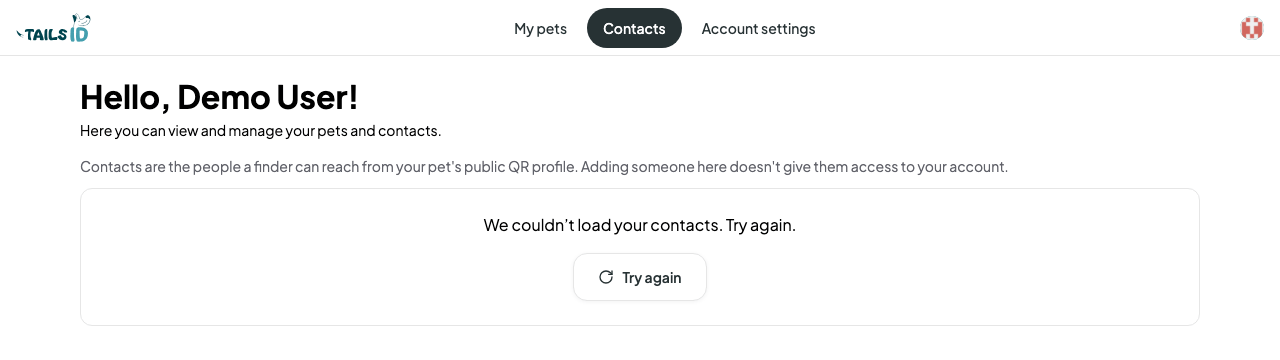
If your pets or your contacts don’t load, My pets and Contacts now say so, with a Try again button. Before, you could be left looking at empty cards, or at “No contacts yet” when you had contacts. Each list now loads on its own, so one doesn’t wait for the other.
The lost-pet card keeps the new name, and a sent message clears#
When your pet is marked as lost and you change their name, the lost-pet card shows the new name straight away. When someone who finds your pet sends you a message from its page, the message box clears once it is sent; if it doesn’t go, the text stays so they can try again.
A saved phone number shows its own country's flag#
A saved phone number shows the flag of the country it belongs to. A UK number shows the UK flag, where it could show Guernsey’s, and the same goes for other codes that several countries share.
Creating an account without a tag no longer talks about a scan#
When you create an account without scanning a tag, the page now says Create your account. “You’re the first to scan this QR!” shows only when you have scanned one.
The home page tag picker keeps your choice, and the store stays in your language#
The tag picker on the home page keeps the tag you chose when the page changes size, and answers your first click even while the page is still loading. Store pages always show in the language you opened them in.