Tails ID changelog

What changed on Tails ID, week by week: new features, improvements and fixes you can use today.

Week 47, 2026 ·

A pet marked as lost now shows as lost on its card

This week a pet you mark as lost shows as lost to anyone who scans its tag, the store’s tag pages stay still until you move them, and the home page shows the tag colours you can buy today.

FixedTags and finder

A pet marked as lost shows as lost on its card and in My pets#

When you mark a pet as lost, the card someone sees when they scan its tag now shows Marked as lost above your contact buttons, and so does your own preview. Your pets list shows it too. Both go back to normal when you mark your pet as home.

ImprovedStore

The tag's size, weight and material are the same on every page#

The product page now shows the tag’s size and weight for the tag you picked, matching the home page. The questions and answers on both pages give the same size, weight and material. The answers also say that someone who finds your pet can scan the tag with their phone’s camera and open your pet’s profile in the browser, over Wi-Fi or mobile data, without installing an app.

ImprovedStore

The store opens the tag straight away, with the right prices from the start#

Opening the store takes you straight to the tag’s page, without first showing a store page that changes a moment later. Back takes you to the page you came from. When you arrive from the menu or a Buy now button, the tag’s prices are right from the start. The store and the feature pages also load sooner, most of all on a phone.

FixedPet profiles

A linked tag stays linked after you save your pet's profile#

After you save your pet’s profile, a tag you linked stays linked, instead of the page offering Link a tag again. My pets, the profile and the scan-to-link screen now agree on which tags are linked. A profile’s own QR code is labelled QR code, so it is no longer mistaken for a tag.

FixedTags and finder

The Preferred label no longer covers the Call button on a pet's card#

On a pet’s card, the Preferred label for the main contact sits below their name instead of over the Call button, so the whole button shows and can be tapped. Screen readers read the button as “Call”.
Week 46, 2026 ·

Every Buy button takes you to the TailsID Smart Tag

This week every Buy button on tails.id takes you straight to the TailsID Smart Tag, the home page shows sooner on a phone, and a few things that could go wrong in your account and the store now behave.

ImprovedStore

Every Buy button opens the TailsID Smart Tag, in the colour you picked#

The buttons on the home page, the feature pages, the blog, your account menu and the setup guide now open the TailsID Smart Tag page. On the home page, the tag picker opens the colour you chose and shows its price. An older link to a tag colour opens the matching Smart Tag colour, or lets you pick one if that colour isn’t sold any more. Changing the colour on the tag’s page keeps any promotion you came with.

ImprovedStore

The home page and the store show sooner, most of all on a phone#

The home page’s main picture now loads first and in a size made for your screen, so the page shows sooner, most of all on a phone. The first photo in the store starts loading earlier too.

FixedPet profiles

Pets and contacts that don't load offer Try again#

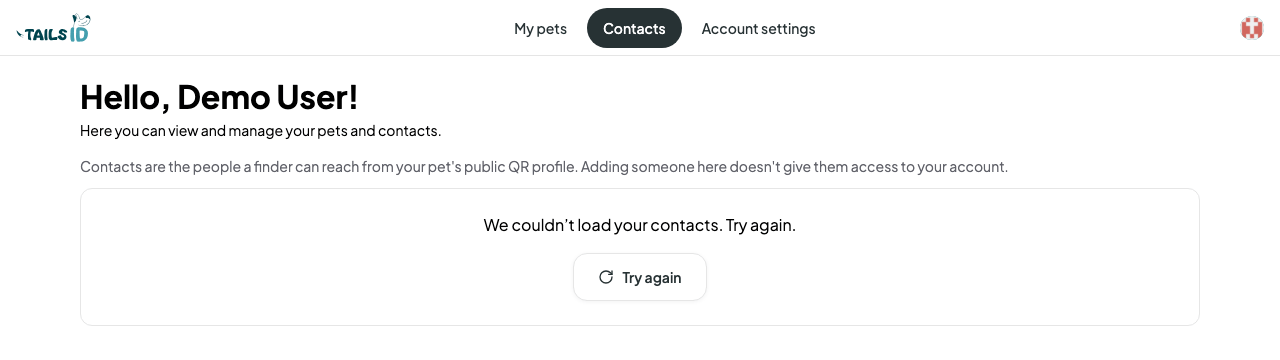
If your pets or your contacts don’t load, My pets and Contacts now say so, with a Try again button. Before, you could be left looking at empty cards, or at “No contacts yet” when you had contacts. Each list now loads on its own, so one doesn’t wait for the other.

The Contacts tab of a demo account: a box that says We couldn't load your contacts, with a Try again button.

FixedTags and finder

The lost-pet card keeps the new name, and a sent message clears#

When your pet is marked as lost and you change their name, the lost-pet card shows the new name straight away. When someone who finds your pet sends you a message from its page, the message box clears once it is sent; if it doesn’t go, the text stays so they can try again.

FixedPet profiles

A saved phone number shows its own country's flag#

A saved phone number shows the flag of the country it belongs to. A UK number shows the UK flag, where it could show Guernsey’s, and the same goes for other codes that several countries share.

FixedPet profiles

Creating an account without a tag no longer talks about a scan#

When you create an account without scanning a tag, the page now says Create your account. “You’re the first to scan this QR!” shows only when you have scanned one.

Week 45, 2026 ·

An invitation to share a pet now opens on tails.id

This week an invitation to share a pet takes you straight to your invitations on tails.id.

ImprovedPet profiles

An invitation to share a pet opens on tails.id#

When someone invites you to help look after their pet, the link in the email now opens Your invitations on tails.id. Sign in or create an account with the email address the invitation went to, then accept it there. If you use Fit Tails, you can sign in with the same account.

Week 44, 2026 ·

Write to us from the Help Center, and see what your pet's page needs

This week you can write to us without leaving the Help Center, and your pet’s page tells you what it is missing.

NewHelp Center

Send us a message from the Help Center#

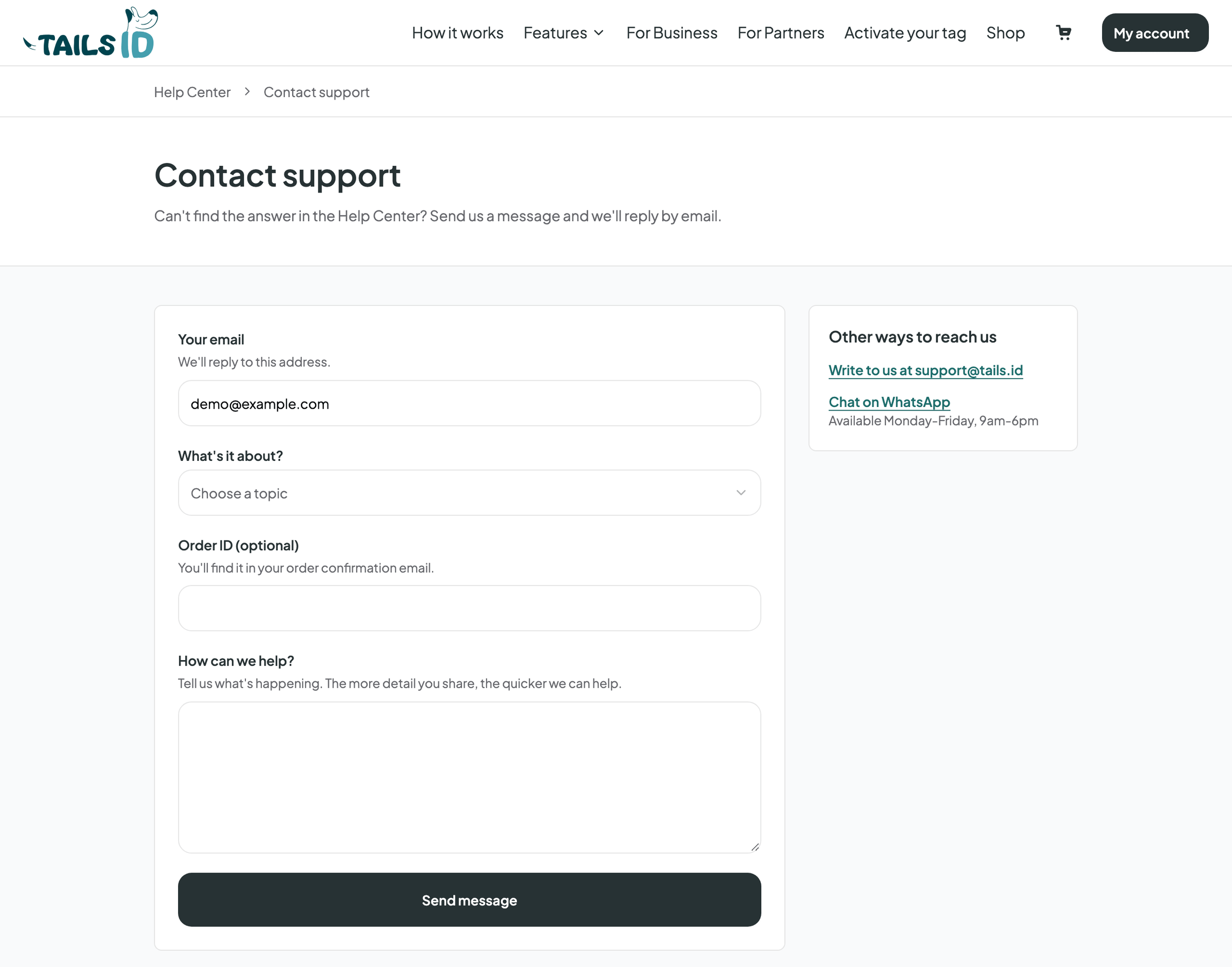
If you can’t find an answer in the Help Center, choose Send us a message at the bottom of any article. Give your email, pick a topic, add an order ID if it’s about an order, and tell us what’s happening. We reply by email. If you are signed in, your email is already filled in. The Contact support button on each Help Center section opens the same form.

From a Help Center article, the visitor opens Contact support, sends the form empty and sees which fields to fill in, then fills them in and sends the message.
The Contact support page in the Help Center: a form with your email, a topic, an optional order ID and your message, with other ways to reach us beside it.

NewPet profiles

See how complete your pet's page is, and what to add next#

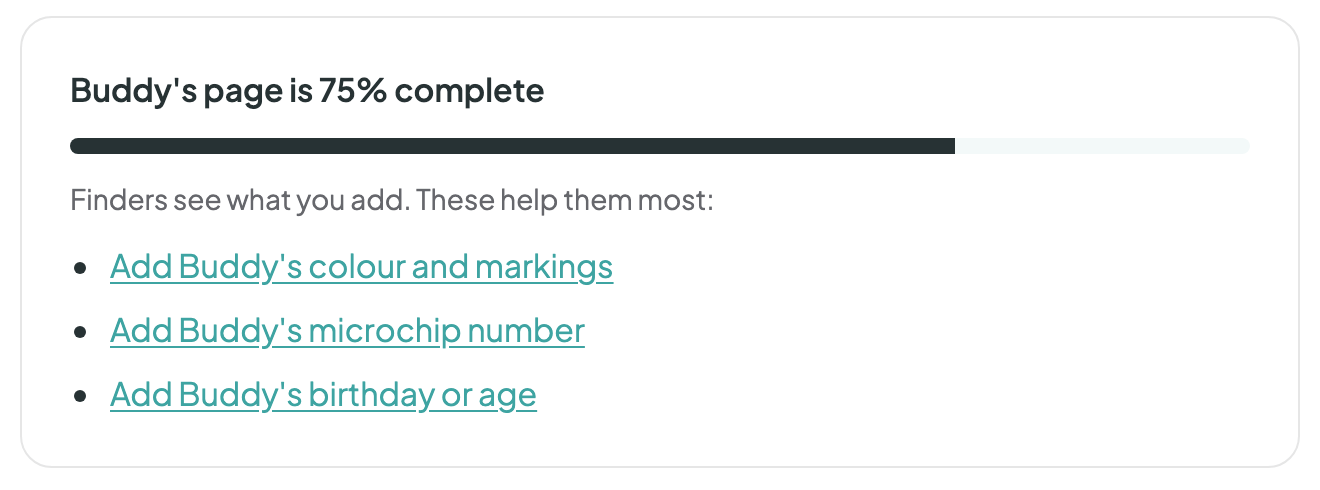
Your pet’s page now shows how complete it is, with a bar and a short list of what to add, such as a photo, a microchip number or a vet. Each item takes you straight to the right field, so you can fill it in and save. The card disappears once nothing is missing.

A card on a demo pet's page that says Buddy's page is 75% complete, with a progress bar and links to add Buddy's colour and markings, microchip number and birthday or age.

ImprovedStore

Pay with Clearpay or Amazon Pay at checkout#

Checkout now also offers Clearpay and Amazon Pay, where they are available for your order.

FixedTags and finder

Activate your tag takes you to the activation step#

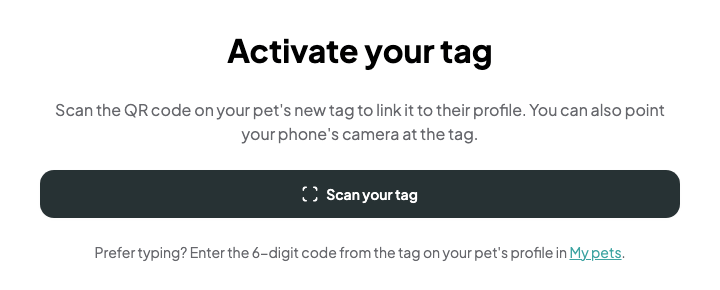
Activate your tag in the site’s menu now asks you to sign in and then opens a step where you scan your new tag. Before, it took you to your pets list. If you are already signed in, you go straight to the scan.

The Activate your tag step: a button to scan your tag, and a note that you can also enter the 6-digit code from the tag on your pet's profile.

ImprovedPet profiles

New phone numbers start on your account's country#

When you add a phone number, the country code now starts on the country in your account. If your account has none, it starts on the country you are in.

FixedTags and finder

Fixes for lost pets and for finders sharing a location#

If you change where a lost pet was last seen after someone else has marked them home, your pet stays home and you see a note saying so. A finder who shares a pet’s location again too soon after the first time now sees that it wasn’t sent yet, instead of being told it was. And if your pet’s status can’t load, their page shows one message with one Try again.

ImprovedStore

Easier to use with a keyboard or screen reader, and the right title in every tab#

On the store, the cart and other public pages, the skip link now takes you past the header to the page itself. Screen readers read the TailsID logo as a link home, and the copyright line in the footer is easier to read. Each page also keeps its own title in your browser tab after it loads.

FixedPerks

A tag request through your employer's perk survives signing in again#

If your session ends while you are requesting a tag through your employer’s perk, signing in again brings you back to the form with your perk still chosen, so your request goes through.

Week 43, 2026 ·

Mark a lost pet, see your orders and assign tags from them

This week you can mark a lost pet, see your orders and the tags in them, and get in touch from almost any page.

NewTags and finder

Mark your pet as lost, with where you saw them last#

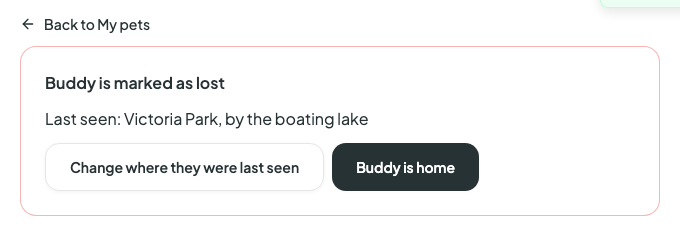
If your pet goes missing, open their page and tap Mark as lost. You can say where you saw them last in your own words, such as a street, a park or a postcode, or add your current location. Everyone who looks after your pet sees the status and the place. When they are back, tap the button that says they are home to clear the status for everyone.

On a demo pet's page, the owner taps Mark as lost, types where they last saw the pet and saves, then changes the place to a postcode.
A demo pet's page with a card that says Buddy is marked as lost, where Buddy was last seen, and buttons to change the place or say Buddy is home.

NewPet profiles

See your orders and the tags in them, and assign a tag to a pet#

A new Orders page in your account lists every order with its status, items, tracking link and dates. Once an order is packed, each tag in it shows which pet wears it. A tag that is not on a pet yet has an Assign to pet button, so you can link it without scanning it first.

ImprovedPet profiles

A clearer account area, with its own navigation and a Save on every tab#

Your account has a new layout that uses the whole screen on a computer. My pets, Contacts and Account settings sit at the top of every account page. When you edit a pet, each tab has its own Save changes, and nothing changes until you press it. Your name and photo have their own Save, kept apart from the password form and account deletion. Pet card menus and the dog or cat choice now work with a keyboard. When you add a phone number, the country is already set to where you are. Every account can now have more than one pet. Links to your contacts open the Contacts tab, and every page has its own title in your browser tab.

ImprovedPet profiles

Say you don't know your pet's birthday, and add adoption and vaccination dates#

Not sure of your pet’s birthday? You can now give the exact date or say you don’t know it. The date picker has month and year menus, so going back several years takes three choices. You can also add the day you adopted your pet and the dates of their vaccinations.

NewPet profiles

Remember a pet who has passed away#

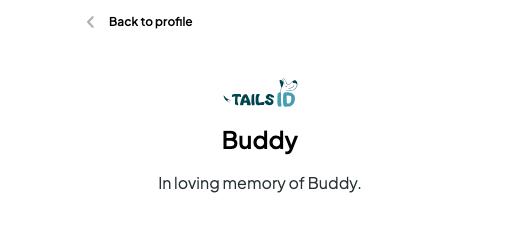
If your pet has passed away, you can mark it on their page. Anyone who scans their tag sees a short notice in their memory instead of the contact card. Their profile stays on your account, and you can move their tag to another pet.

A demo pet's tag page after the pet has passed away: the pet's name and the words In loving memory of Buddy.

NewPet profiles

Add all your pets, with no plan to pay for#

You can now add as many pets to your account as you have, at no cost. Before, a second pet needed a plan. Add each one with Add pet, and each gets a page of their own.

ImprovedTags and finder

Linking a tag names the pet and shows the code printed on the tag#

When you link a tag, the confirmation shows the pet’s name, photo, breed and age, and the code printed on the tag in your hand. It also says what happens to a tag the pet already wears. If you scan a new tag and sign in, you now go straight to linking it, instead of landing on your pets list.

ImprovedStore

A clearer cart, with one line per tag and the pet each one is for#

The cart shows one line per tag, with the same name as on the product page. An engraved tag shows its engraving on its own row, and the summary shows any saving and discount as they apply. When you are signed in and have pets on your account, you can say which pet each tag is for. Shop in the header now takes you straight to the tag.

ImprovedStore

More ways to pay at checkout, and your phone number is optional#

Checkout now offers Apple Pay, Google Pay and Klarna as well as cards, depending on your device. A phone number is now optional.

NewHelp Center

Chat with us on tails.id#

You can now chat with us from the chat button on tails.id. It appears once you have answered the cookie banner, on the store, Help Center and account pages, and never on your pet’s public card.

Week 42, 2026 ·

Screenshots and short clips in Help Center articles

This week the Help Center shows you each step as well as telling you.

ImprovedHelp Center

Help Center articles show you where to tap#

Step-by-step articles in the Help Center now include phone screenshots, with the button to tap ringed and numbered. Longer tasks, such as setting up or linking a tag, also have a short silent clip. Each picture has a caption, and they all use a demo account, never a real one.

Week 41, 2026 ·

Finders see your pet's whole card, and every Help Center article shows

This week the card a finder sees is complete for every pet, and the Help Center shows all of its answers.

ImprovedTags and finder

Everyone who scans your pet's tag sees the whole card you share#

When someone scans your pet’s tag, they now see every detail you have chosen to share: all your contacts, the registration and vet details, behaviour notes and insurance. Your privacy switches still decide what is hidden.

FixedHelp Center

The Help Center lists every article#

Some Help Center categories showed only their first ten articles. Every article now appears in its category, and a link to a page that does not exist shows a proper “not found” page instead of a blank one.

ImprovedPet profiles

Confirm your email with a code when you create an account#

When you create an account with an email and password, we send a six-digit code to that address. Enter it to finish signing up, and your email is confirmed straight away, with no separate verification email to look for later.

Week 40, 2026 ·

Choose what finders see on your pet's card

This week you decide what a finder sees on your pet’s card, and buying a tag gets a little simpler.

NewPet profiles

Choose what finders see when they scan your pet's tag#

Each pet now has its own privacy switches. You choose which details a finder sees when they scan the tag, and for each contact you can hide the phone number, the address or social accounts. When you hide an address, finders still see the postcode and town, so they know roughly where your pet lives. Your own view of the card shows everything, with the hidden details marked.

ImprovedStore

A simpler product page, with a family pack for homes with several pets#

The tag’s product page is shorter and easier to read on a phone. The page no longer asks you to choose a tag type before you buy. The colour choices are square tiles, and a new family pack block helps you order a tag for every pet in your home. The header, cart button and cookie banner also sit better on small screens.

ImprovedStore

Your order shows a photo of your tag, and the email leads you to set up your pet#

After you pay, the confirmation page and the order email show a photo of the tag you bought. The email’s link to set up your pet now takes you straight to adding your pet once you sign in, instead of leaving you on your account page.

ImprovedPet profiles

The password checklist shows exactly which rule is missing#

When you create an account, reset your password or change it, the checklist marks the rule your new password still misses in red. The same message no longer repeats below the form, and screen readers announce what is missing.

Week 39, 2026 ·

Clear password requirements, ticked off as you type

Choosing a password is clearer this week, and pet profiles keep what you entered.

ImprovedPet profiles

Password requirements you can see as you type#

When you choose a password, whether you are signing up, resetting it or changing it in your account, the form lists what it needs and ticks off each requirement as you type. If something is missing, it tells you exactly what to add. Signing up, resetting and changing your password now follow the same rules, so a password one accepts is never refused by another. The password you use today keeps working.

FixedPet profiles

Saving a pet's profile keeps its breed#

Saving changes to your pet’s profile no longer clears the breed you chose.

Week 38, 2026 ·

Verify your email address from your account

Your account can confirm your email address this week, and two rough edges in the store and the account menu are smoothed out.

NewPet profiles

Verify your email address with a link or a code#

Your account pages now ask you to verify your email address. We send you an email with a link and a six-digit code: open the link, or type the code on the page. If the email does not arrive, you can ask for another one from the same page.

FixedStore

Tag photos in your cart, and no empty panel on the product page#

Every Tag MAX line in your cart shows a photo of the tag in the colour you chose, where it used to show an empty square. On the product page, the tag’s photo shows while its video loads, and stays if the video cannot play.

FixedPet profiles

The account menu keeps working when you resize the window#

The account menu no longer stops working when you resize your browser window from a phone-sized layout to a wider one, or back.